
Skip to content

FieldOps by Inistate for field service teams

Keep your team
in the field.
Your business
in control.

Great service starts with a team that knows what comes next. Field service management software that keeps your jobs, technicians, parts, and paperwork in one workflow means less time chasing updates and more time serving customers.

One workflow. A stronger field service business.

Field service workspaceExample preview

YOUR TEAM. YOUR JOBS. ONE CLEAR VIEW.

A smoother day in the field.

SL
Jobs today12A plan everyone can see
On site04Know what is moving
Completed06Ready for the next step
JOB / TECHNICIANSTATUS
Air-con maintenance09:00 · Amir · Maple Residences
On site
Water pump repair11:30 · Sarah · Parkside Offices
Scheduled
Electrical inspection14:00 · Daniel · Skyline Retail
Scheduled
Less chasing. Better service.

A stronger business starts with

Empowered technicians Smoother processes Visible performance Professional service

FROM THE OFFICE TO THE PALM OF THEIR HAND

Everything they need.
Wherever the job takes them.

A clear schedule before the visit. A complete record after it. Give your technicians one place to see the next job and capture the details that matter.

Start the day with a plan

Job details, site information, and the next visit in view.

Finish with a complete record

Checklists, parts, time, and customer sign-off together.

See how it fits your team
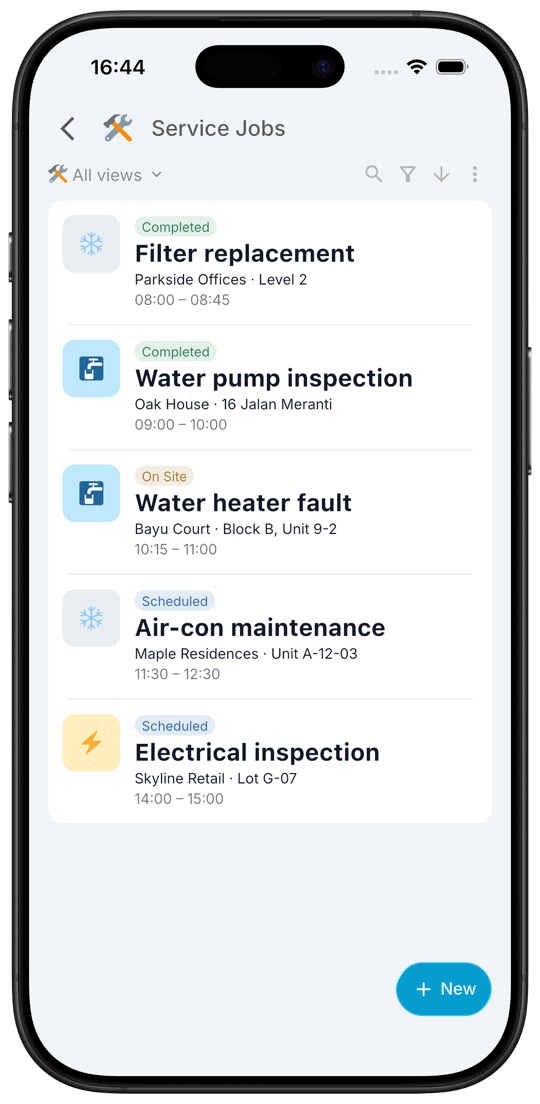
Illustrative mobile schedule with three assigned service jobs and their visit status
A clearer day ahead.
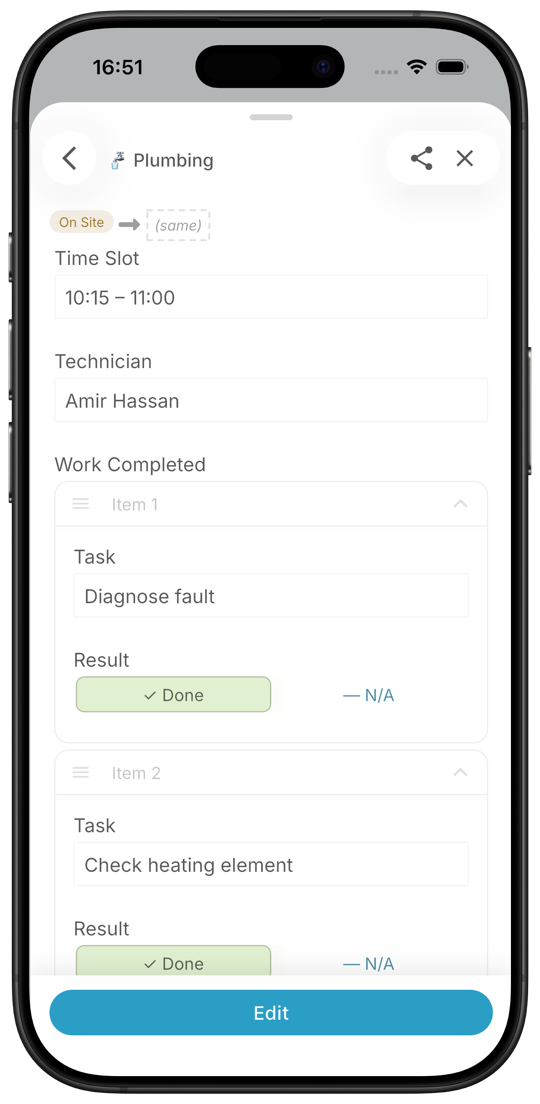
Illustrative completed service report with checklist, parts used, time on site, and customer sign-off
Good work, recorded.

Illustrative app concepts. Your workflow, configured for your team.

REAL CHALLENGES. A CLEARER WAY TO WORK.

Good service takes people.
Give them less to worry about.

A missed job. A missing part. Another call for an update. Bring the answers together before small gaps become unhappy customers.

02 / TECHNICIAN ACCOUNTABILITY

“Was the job done properly?”

Make good work visible.

Give technicians clear job steps on their phone. Keep checklists, time and location records, photos, and customer signatures together so supervisors can review the work with context.

Clear expectations. Work you can verify.
03 / CUSTOMER COMMUNICATION

“When will you arrive? Is it fixed?”

Keep customers in the loop.

Build status updates into your workflow. Keep visit timing, progress, and service reports easy to share, so customers know what to expect and what was done.

More confidence. A reason to call again.
04 / SPARE PARTS & INVENTORY

“Do we have the right parts?”

Be ready before the visit.

Connect parts usage to each job. Set up stock records for your stores and vans, deductions when parts are used, and low-stock alerts to help avoid extra trips and unaccounted costs.

Better preparation. Fewer return trips.
05 / ADMIN & PAPERWORK

“Why is there still so much paperwork?”

Finish the job. Move forward.

Capture the details once in a guided completion flow. Use the job record for reports, invoice preparation, and follow-ups so the office spends less time re-entering the same information.

Less admin. A clearer path to payment.

ONE JOB. ONE CONNECTED WORKFLOW.

From “Can you come over?”
to “All taken care of.”

Connect the office and the field around the same job. Adapt the steps to the way your service team works.

  1. 01

    Schedule & assign

    Capture the request, site, and scope. Assign a technician and make the visit details clear.

  2. 02

    Arrive & do the work

    Follow the checklist on site. Record time, photos, notes, and parts against the job.

  3. 03

    Complete & confirm

    Review the work, capture customer sign-off, and prepare a service report from the job record.

  4. 04

    Invoice & follow up

    Pass complete details to the office for billing. Track the next action and plan the next service.

Every visit has an owner. Every job has a next step.

The template you start from

Field Service Job

Pick Field Service Job when you create your workspace. It opens with these states and steps, plus 6 sample records, so you can walk a record through before your own work goes in. Change any of it as you go.

Fields

  • Customer
  • Site Address
  • Job Type
  • Technician
  • Scheduled Date
  • Parts Used
  • Hours
  • Photos
  • Invoice Amount
See all templates
Field Service Job workflow Starts at Scheduled. From Scheduled, Clock In moves it to In Progress and Cancel moves it to Cancelled. From In Progress, Complete Job moves it to Completed. From Completed, Send Invoice moves it to Invoiced. Clock InComplete JobSend InvoiceCancel ScheduledIn ProgressCompletedInvoicedCancelled

HAPPY CUSTOMERS BRING MORE BUSINESS

Service they remember.
A team they call again.

Give your technicians the details to arrive prepared, do the work well, and leave a clear record. Make every visit a chance to earn the next one.

Bring your service workflow to life
Technician checking his phone beside an organised service van before a visit
Arrive prepared.
Technician and homeowner reviewing a tablet together after a service visit
Leave with confidence.
Great service is a team effort.

BETTER FOR THE WHOLE TEAM

One shared view.
Everyone moving together.

Keep the office, technicians, and service leaders connected, with the information each person needs to do their part.

See it for your team
01

For technicians

Know where to go, what to do, and what to record. Spend less time on paperwork and more time getting the job done.

02

For dispatch & admin

Plan visits, check progress, and work from complete job records. Answer customer questions without calling every technician.

03

For service leaders

See workloads, review service quality, and spot delays. Support your team with a clearer picture of the work.

LET'S MAKE IT PRACTICAL

A few things you
may be wondering.

Can we use our own job steps and checklists?

Yes. Configure the workflow around your service types, required fields, checklists, and review steps. Bring a sample job sheet to the demo so we can walk through the setup your team needs.

Can technicians update jobs from their phones?

Technicians can record job details from their phones, including notes, photos, and completion information. We can review the devices, site connectivity, and capture requirements your team works with during the demo.

Can we connect parts, reports, and invoicing?

Start with the job record and configure the related stock, reporting, and billing steps. Bring examples of your parts records and invoices so we can review the rules and any integrations your process requires.

Do we have to change everything at once?

Start with one job type and a small team. Get scheduling and job completion working for them, then add parts tracking, customer updates, and recurring maintenance as you are ready.

What should we bring to the demo?

Bring a typical service journey, a sample job sheet, and a service report with customer details removed. We'll use them to discuss assignments, field updates, and the handoffs that matter to your business.

MORE JOBS. HAPPIER CUSTOMERS. A STRONGER BUSINESS.

Field service done right.
Service that grows.

Help your team work with confidence.
Give every customer a reason to come back.

Book a demo Let's walk through your field service workflow together.

BUILT ON INISTATE

FieldOps is Inistate,
set up for field service teams.

Inistate is an operational workflow platform for people, AI, and automation. FieldOps starts you with the Field Service Job template. Add the next process into the same system when you are ready.

Select a state, a step or a field to see how they connect.

States

Steps

    Information